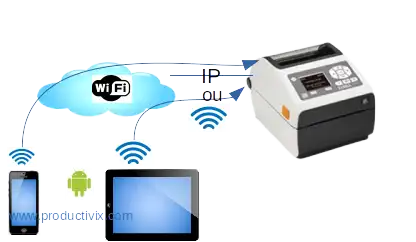
PDA & label printer integration: connection architectures for traceability
Traceability in SMEs is not about the label… it’s about integration with your existing systems
In a mobile traceability project, the barcode label, the input screen, or the RFID tag is only the visible part. The real challenge is integration: how will your mobile terminal (Android PDA, ruggedized smartphone, barcode reader) connect to your existing information systems — ERP, SQL database, CRM, shared Excel file — and to your printing equipment?
At Productivix, we design native Android and Web applications that interface with your existing infrastructure: desktop or industrial label printers (Zebra, Toshiba TEC, Bixolon, Honeywell), SQL/NoSQL databases, REST APIs, and WiFi/4G/5G networks. The goal: make your tools communicate without replacing your equipment, preserving your hardware and software investments.
The result? End-to-end traceability where every scan, every print, every update feeds your central system without re-entry, without disruption, without data loss.
Let us design your traceability application project with “Edge” distribution of computing power
With explanations of the different ways in which smartphones and Android mobile computers can be connected to databases and printers on the move, design your barcode, RFID traceability application project!
Capture, print, share, update, store!
Prerequisites: read: advantages of ruggedized scanner terminals
Why integration with your existing systems is the key to traceability
A high-performance mobile traceability solution is not limited to scanning barcodes and printing labels. It must integrate:
- With your ERP (SAP, Sage, Microsoft Dynamics, Odoo…) via APIs or direct SQL connections
- With your databases (SQL Server, MySQL, PostgreSQL, MongoDB) for real-time read and write
- With your label printers (Zebra, Toshiba, SATO, Honeywell) via Bluetooth or WiFi/IP
- With your existing terminal fleet (ruggedized PDAs, Android smartphones, tablets)
This integration eliminates double entry, reduces errors, and ensures that traceability data is automatically fed back into your central information system.
The Edge computing model: an architecture designed for integration
“Mobile Edge Computing” is a model of distributed computing between mobile terminals across the network, whether private or not, using Cloud resources as little as possible, like an ERP, thus staying at the “edge” of the Cloud, which explains the term “Edge”. Terminals have their own database system, a physical or virtual display and keyboard, and above all permanent memory and super-powerful processors: that’s more than enough.
So what’s the point of Edge Computing?
They can connect to local sensors and collect measurement data, which can then be processed and, if necessary, sent to the Cloud. Analyses are produced locally, process statistics are local, and local simulations, requiring no latency (with or without an immediate network), are perfectly suited to empowering people and lightening networks and servers!
This data structure is well-suited to self-monitoring, self-diagnosis, easy-to-install monitoring without IT specialists, with redundancy (self-replacement of data or machines), encryption (digital signature) on-the-spot of proof data for authentication, for example.
At the end of the “Edge” process, only the data required for the Cloud, ERP or digital evidence archiving server, for example, is transmitted for storage.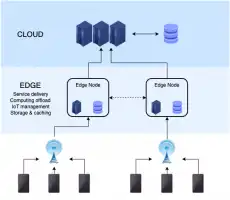
Edge structure for remote calculations on the terminal, linked to databases on lightweight servers
Edge computing works where the action is, close to the production site, where autonomy and reactivity are required with a minimum of equipment: these are the points in common with Lean management after all.
We use all the possibilities of Edge computing in our mobile products and software: so you’ll need a minimum of networks and servers.
We’re assuming here that you know how to acquire barcode or RFID data on your mobile and want to print, share or store it (other pages on this same site provide information on these subjects).
Different mobile data exchange architectures possible in operation
The Android terminal communicates via WiFi or 3/4/5G or BT (Bluetooth) in native apps or web apps
Here we present the different connection structures between terminals and databases for Android.
Interchange via USB: just print from our Windows web-apps
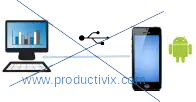
Android interchanges via USB
First of all, USB connections with an Android are useful for loading programs (APK) on certain smartphones: this is the only use for this mode, although it can be done by scanning the QR code of the APK address. But on some ruggedized terminals, there are no longer any USB connectors, so this mode, inherited from the old Windows CE world, can no longer be used in “operation” mode for mobile apps.
Our web-based apps can print from a MAC or Windows PC running Chrome via USB, with the addition of a server app that we supply.
We’re therefore working on mobile network connections with native apps or web apps:
- WiFi for “indoor” applications indoors or close to premises
- 3/4/5G for outdoor mobile applications.
Interchanges via WiFi + 4/5G on Excel/CSV databases: discontinued for security reasons
The database is an Excel/csv file, stored on a PC linked by IP: here exchanges are limited to a single direction: either a reading of the table (parameters) by the terminal, or an addition of lines in another (entered data). This system is even more limited when there are several terminals connected: it’s low-cost in terms of maintenance and is reserved for a few cases with no future development, and it is strictly forbidden by Windows for security reasons. So no longer used.
Interchanges via WiFi-4G on SQL/NoSQL databases or via API: recommended
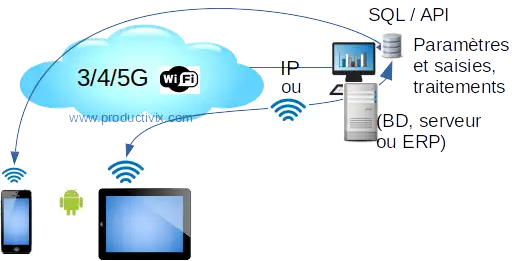
Mobile IP connections with SQL/NoSQL databases via API
See our favorite no-code interface with your databases.
The database is of the SQL/NoSQL type, or can be accessed by an ERP via API: depending on rights, exchanges can be read and write, with non-competing access processes to data modifications: ideal for professional working structures on mobile terminals. “Edge computing” can then be carried out on the terminal: calculations and results can be displayed in addition to traditional data collection.
Now that we’ve finished with data entry, let’s move on to printing on labels or receipts:
Possible mobile data printing architectures: receipts or labels, reports
This section covers label printing for the two major types of mobile apps we make: native Android app and web app.
As a web app, you can print with our apps via:
- BT (Bluetooth) from Windows/Chrome, Linux Chromium, MAC on a Bluetooth printer, therefore dedicated to one terminal,
- WiFi also from Windows/Chrome, Linux Chromium, MAC on a network printer, therefore shared between terminals,
- USB from Windows/Firefox or Chrome or Mac
In native app (Android): you can print via dedicated BT or WiFi/Ethernet, on a network printer, therefore shared between terminals.
Be careful with your purchases if they are made ahead of the project with a poor choice of interface technology, as label printers may be unusable or limit the project to a single type of development! With some printers, you can simply change the network card.
BT printing: the most personal and versatile
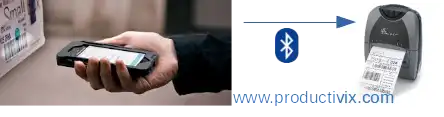
Personal mobile printer to terminal connection mode: via Bluetooth
BT printing is generally reserved for mobile printers worn on a belt, close to the operator’s hand. Receipts or self-adhesive labels with barcodes or RFID tags can be printed. The data to be printed is sent via the BT of the rugged smartphone carried by the operator. Table-top printers connected by BT are also conceivable: this is reserved for nearby terminals, like on a counter.
Printing via WiFi/IP: the most widely shared, easily available natively, a bit less in web app

Shared label printer connection mode to mobile terminals: via IP (fixed) wired or WiFi
The printer (office or industrial) is connected to a network via an Ethernet cable (fixed IP) or WiFi, so it’s shared and data is sent by native or web terminal applications. In general, only one label format is used per machine, so there are no surprises when printing after a format change.
Ready to integrate your mobile traceability with your existing systems?
You now have all the keys to understand the possible architectures: from connecting to your ERP via API to printing on your label printers via Bluetooth or WiFi. Integration is the key to effective traceability — we are here to help you choose the right interfaces and design your custom application.
Contact us for your project!