ZPLocal™ : Print your ZPL labels from a web application, using a local print spooler
The situation
Your operators enter data on an Android device, a smartphone or a Windows PC. Your application runs in a browser, over HTTPS. And at the other end of the chain, a Zebra, TSC, Xprinter or Honeywell thermal label printer is waiting for a ZPL stream via direct printing (raw printing) — via USB on a workstation, or via Wi-Fi/Ethernet on port 9100.
The problem
A browser cannot send a raw print stream to a printer. A page served over HTTPS cannot open a TCP socket to 192.168.1.50:9100, nor can it control a USB printer. And cloud-based printing solutions route your label data — product references, GTINs, batch numbers — through third-party servers, often located abroad.
The solution
Productivix has developed a comprehensive solution to this problem: ZPLocal™, a packaged local print proxy that can be controlled via HTTPS from any web application, coupled with a service providing ZPL label templates with variables, hosted in Europe and featuring 100% Productivix code — no third-party services in the chain. Its name sums up its advantage: the print stream remains local — only the variables are transmitted, in encrypted form, to the template service. This article explains the technical problem, the architecture of ZPLocal, the systems with which it integrates, and how it compares to existing tools.
Why can’t a web application print directly in ZPL?
Thermal label printers operate using direct printing (raw printing): the label’s native code — ZPL (Zebra Programming Language) for Zebra and compatible printers — is sent directly to TCP port 9100 (JetDirect/RAW protocol) or via the USB port of the host device. No drivers, no PDF files, no print dialogue: this is what makes industrial labelling fast and reliable.
However, from a web page:
- the browser cannot open a TCP socket to IP:9100;
- a page served over HTTPS cannot call a local HTTP service (mixed content rule);
- USB is not accessible from the browser;
- printing via
window.print()requires a driver and a dialogue box — unsuitable for a warehouse labelling workstation, and often incompatible with a thermal printer configured for ZPL.
The only clean solution: a local relay installed on the client’s network, capable of receiving print commands via HTTPS and converting them into raw data streams for the printer. This is exactly what we have developed.
ZPLocal: a local print proxy, packaged and operated over HTTPS
Architecture

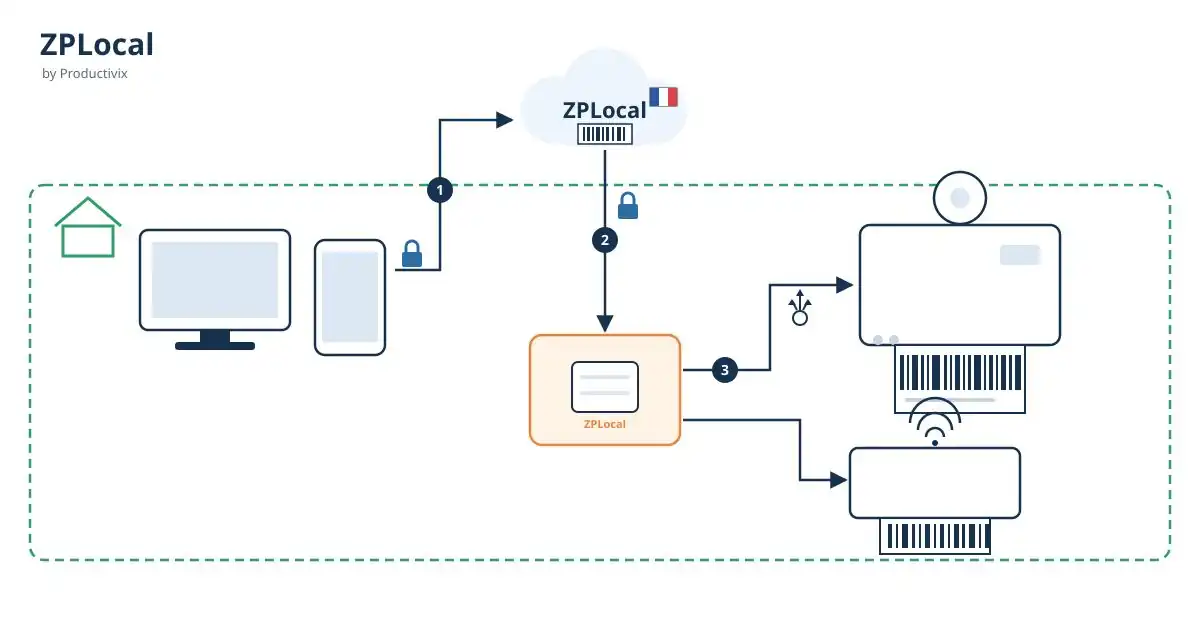
ZPLocal block diagram
The diagram shows the three numbered steps and the ‘customer’s local network’ boundary:
- The terminal (Windows/Linux PC or Android, iOS, any browser – no installation required) sends only the label variables — product code, GTIN, model, target printer — via HTTPS to the ZPLocal template service, hosted in Europe (100% Productivix code).
- The template service generates the complete ZPL file from the template and sends it to the ZPLocal proxy via HTTPS.
- The ZPLocal proxy sends the print stream via direct printing (raw printing) to the designated printer: via USB on the relay workstation, or via Wi-Fi/Ethernet on port 9100. This print stream never leaves the client’s network.
ZPLocal is packaged as an application that can be installed on the client’s premises (Windows or Linux executable). It can be installed in a matter of minutes on any workstation on the network, without complex network configuration; it is secure, customisable and can be deployed remotely.
What the ZPLocal proxy offers:
- HTTPS bridge: → direct printing: your web application, even if served entirely over HTTPS, triggers printing without ever bypassing the browser’s security rules.
- USB and network: the proxy routes the data stream to a printer connected via USB to a workstation, or to any label printer accessible on the network via IP:9100.
- Multiple printers with a single setting: a single call specifies the target printer — you can control as many printers as required (workshop, dispatch, stock in/out labelling) from a single application.
- 100% local print stream: the entire stream — ZPL and label data — remains on the client’s network. Only the variables are transmitted, encrypted via HTTPS, to the template service hosted in Europe, built entirely on Productivix technology: no third-party servers in the chain, a key factor for confidentiality and GDPR compliance.
- Multi-device support: Windows PCs, Apple devices, and Android or iOS tablets and smartphones on the same Wi-Fi network can print to the same printers using the same interface.
+A service providing ZPL label templates with variables
The proxy does more than just route data: it utilises our ZPL template service, hosted in Europe, with code that is 100 per cent Productivix.
You store your ZPL label templates with variables: product code, GTIN, description, batch, use-by date, quantity, barcode type, etc.
At the time of printing, the application sends only the variables (e.g. { ‘product’: ‘REF-1024’, “gtin”: ‘3760123456789’ }).
The service generates the complete ZPL code — including EAN-13/Code 128/QR barcodes — and sends it to the designated printer.
In practice:
- edit a label in one place only;
- ensure your labels are GS1-compliant (GTIN, standardised barcodes) for your industrial clients and the retail sector;
- test your templates on either a physical printer or a ZPL viewer before going into production.
Compatible with your ERP systems and platforms — even those without a ZPL module
This is the key finding of our compatibility study: most ERP systems and business platforms on the market do not offer any native ZPL printing solution. As long as they allow the insertion of JavaScript or custom scripts, our solution integrates with them with very little effort, even remotely, without affecting the core of the software.
| System / ERP | JavaScript customisation | Native ZPL printing | Benefits of our solution |
|---|---|---|---|
| SeaTable | Built-in JS script editor | No | Provides ZPL and direct printing via scripts |
| Dolibarr | JS injection via hooks (lightweight module) | No (labels in PDF) | Replaces PDF with raw ZPL, which is clearer and faster |
| Appsmith, Budibase, ToolJet | Full JS support in widgets | No | Print labels in your low-code apps with a single call |
| NocoBase | Blocks and JS code | No (document rendering) | ZPL + direct printing |
| Grist | Custom HTML/JS widgets | No | ZPL + direct printing |
| Axelor | Customisable JS front-end | No | ZPL + direct printing |
| Odoo | OWL framework, JS views | Yes (modules) | Simple, multi-brand alternative, independent of the App Store |
| ERPNext / Frappe | Client-side JS scripts by DocType | Yes (dedicated apps) | Unifies multi-ERP / multi-brand printing |
| Baserow, NocoDB | No (API/webhooks) | No | Integration via API only, subject to assessment |
Our solution brings ZPL where your ERP lacks it — and standardises printing across your entire application portfolio where it already exists.
How do we compare with existing, alternative solutions?
| Solution | Type | Local data? | Variable ZPL templates? | Multi-brand? | Pricing | USB + network printer? |
|---|---|---|---|---|---|---|
| ZPLocal by Productivix | Packaged local proxy + template service | ✅ | ✅ | ✅ | Annual subscription per model, unlimited prints and terminals | ✅ |
| QZ Tray | Open-source local agent with limitations and safeguards | ✅ | ❌ | ✅ | Free (LGPL), integration at your own expense | ✅ |
| Zebra Browser Print | Free Zebra local agent for Windows | ✅ | ❌ | ❌ (Zebra only) | Free (Zebra printers) | ✅ |
| PrintNode / cloud services | Subscription-based cloud relay | ❌ (cloud transit) | ❌ | ✅ | Per-computer subscription | ✅ |
| Labelary | ZPL rendering API (PNG/PDF) | ❌ (cloud) | Partial (rendering) | ✅ | ✅/freemium | ❌ (no printing) |
| ZPL.AI, zplCloud | ZPL design/sharing SaaS | ❌ (cloud) | ✅ | ✅ | ❌ (SaaS) | ❌ (no local relay) |
| Loftware NiceLabel | Enterprise label management | ✅ / hybrid | ✅ | ✅ | ❌ (annual licences per printer) | ✅ |
| BarTender (Seagull) | Enterprise labelling suite | ✅ | ✅ | ✅ | ❌ (subscription/licences) | ✅ |
The proven benefits of ZPLocal
- A complete end-to-end solution: local print relay and ZPL template engine — whereas competitors offer only one or the other. 2. The print stream never leaves the client’s network: only the variables (product reference, GTIN) are transmitted, encrypted via HTTPS, to the template service hosted in Europe, built entirely on Productivix code — no third parties in the chain, ensuring GDPR compliance and industrial confidentiality. 3. An all-inclusive annual subscription per model: unlimited printing, terminals and printers — no per-job billing or per-device licensing, unlike enterprise suites and cloud services billed by volume or per printer.
- Works from any device: Windows/Linux PCs, Apple devices and Android or iOS terminals on the same network, using the same web application.
- Multi-printer and multi-brand support: Zebra, TSC, Xprinter, Honeywell, Bixolon… via USB or Wi-Fi/Ethernet (port 9100), designated by a simple setting.
- Remote deployment: proxy installation and updates without the need for on-site visits, including on clients’ workstations.
- ZPL where your ERP doesn’t support it: SeaTable, Dolibarr, NocoBase, Grist, Axelor, Appsmith… integration via a few lines of JavaScript, without modifying the core software.
- Centralised templates: a label modified once applies everywhere, without redeploying the application or making changes to individual workstations.
- French expertise in barcodes and GS1: designed and supported by Productivix, a specialist in traceability via barcodes, OCR and RFID for industrial SMEs and SMIs.
Frequently Asked Questions
What is ZPLocal?
ZPLocal is Productivix’s solution for printing barcode labels from a web application: a packaged local proxy, installed on a workstation within the client’s network, which receives print jobs via HTTPS and sends them for direct printing (raw printing) to label printers — via USB or port 9100 — coupled with a variable ZPL template service, hosted in Europe and written entirely in Productivix code. The ‘Local’ in the name refers to its key advantage: the print stream never leaves the client’s network.
How do you print a ZPL label from a web page?
As the browser cannot open a socket to the printer, a local relay is required: ZPLocal, installed on a computer within the network, receives the print job via HTTPS from the web application and sends it via direct printing (raw printing) to the printer, either via USB or port 9100.
What is port 9100 on a label printer?
It is the standard TCP port for direct printing (JetDirect/RAW protocol) on network printers: the raw data stream — ZPL for Zebra and compatible printers — is sent via this port without a driver or print dialogue.
Can you print from an Android or Apple (iOS) device?
Yes. The web application calls ZPLocal from the Android or Apple browser (on the same Wi-Fi network as the printer or relay station), and printing is triggered in exactly the same way as on a PC.
How much does ZPLocal cost?
An annual subscription per model, with no long-term commitment, covering hosting of the template service in Europe, proxy updates and support; printing, terminals and printers are unlimited. A one-off set-up fee covers commissioning (proxy, printers, template creation, ERP integration). There is no volume-based or per-printer billing.
How do I manage multiple label printers?
Each print job specifies the target printer via a parameter. A single relay station can control all printers on the network, via USB or Wi-Fi/Ethernet.
Does it work with Dolibarr or SeaTable?
Yes. These platforms do not have native ZPL printing: a few lines of JavaScript (SeaTable scripts) or creating a module within Dolibarr are all that is needed to call ZPLocal, send the variables (reference, GTIN, etc.) and trigger printing — remotely, without modifying the core of the software.
How do I edit a label template without redeploying the application?
ZPL templates are stored in the template service. Edit the template once: all workstations and terminals will print the new version.
Is the data from my labels sent over the internet?
No, not the print stream: this remains on the client’s local network, between the proxy and the printers. Only the variables (product code, GTIN) are sent to the template API, hosted in Europe, built entirely with Productivix code, on a secure subdomain.
Get your project started with ZPLocal™
If you use an ERP or business platform without a ZPL module, and you want to print GS1-compliant barcode labels from your web application on a PC, Android or Apple device without relying on a third-party cloud service: ZPLocal can be installed on your premises in a matter of minutes and can be updated without redeploying your application.
Productivix designs and deploys barcode, OCR and RFID traceability solutions for industrial and logistics SMEs and SMIs. Book an appointment online with us for a demonstration on your own network, using your own printers and labels.
For further information: