
Cost-effective barcode inventory solution by location
‘We offer this simple version adapted to the budgets of SMEs,craftsmen and shops because they waste too much time on inventories, and stock errors cost the company dearly’ - W. Piedfort - creator of mobile apps
Customer testimonial (for several apps owned for 5 years)
Pierre-Jean Leturcq, from Belgium, writes: ‘Great company and its manager tries to find solutions tailored to your problems.’
Economy version
by scanning product barcodes from the camera of any Android smartphone, version with imager (integrated scanner) fast on professional terminal.
Save time on your facility’s opening times by using a performance tool to inventory and enter your depots and warehouses more quickly and error-free.
Does not require integration into the company’s IS :
The price does NOT depend on the number of products or items to be scanned, as is the case with our competitors, but on the duration of use (minimum one semester) and the number of terminals or smartphones: e.g. from 140€ for camera scanning and CSV export over 12 months
Measurable return on investment from the very first inventory!
Mobile application for inventory by barcode, simple or by location with option to display designations
Export results as unique .csv format files: including date and time of export, and the unique number of the device that performed the inventory operation, or direct update on databaseOnce you’ve downloaded the csv file(s), you can edit it, print it out, insert tabs or macros in Microsoft Office or LibreOffice, then import it into your management software, measure discrepancies against the situation in the management software, ERP, inventory management, or through our favorite no-code interface with your databases as option
How do I take a physical inventory with our mobile inventory application?
It goes without saying that all items, finished products or supplies and locations must be labelled with a barcode item code. If this is not the case, contact us for a mobile product labeling application.
Once all your items have been identified, you can start an inventory.
Quick to learn on a smartphone
Scanning is done using the barcode image in the camera (smartphone, phone): one press and the mobile application reads the barcode, adds a quantity 1 to the item already scanned, or adds it to the list. Version also available with fast imager on professional terminal For each item, you can adjust the quantity in increments of 1, or even delete the line. Once a location has been completed, save it and move on to the next.
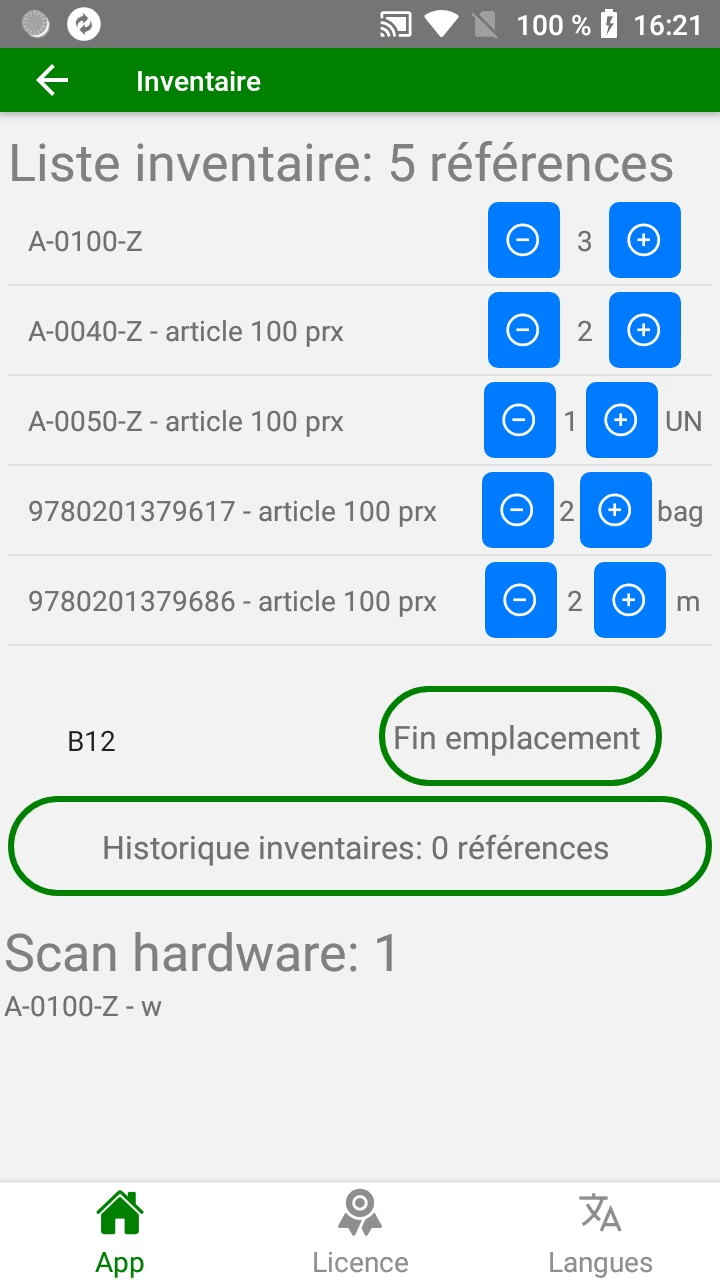
Single or multi-terminal inventory app via imager or camera
Once the inventory has been completed, the work is exported as a csv file or through our favorite no-code interface with your databases as option
It’s impossible to overwrite the previous file, and you can set up several smartphones in parallel by zone to speed things up: the files will never have the same name, so there’s no risk of files being overwritten when the results are consolidated by Excel or OpenOffice/ LibreOffice.
Method for managing inventories by zone, by rotation:: In order to avoid having to inventory everything at once, and to avoid closing the establishment or business to the public, or blocking warehouse flows, and provided that products with the same item code are in the same zone, it is possible to divide the establishment into zones. Each zone is independently inventoried once or several times a year.
If you need a version with different capabilities, as developers, we can build it for you (e.g., add batch management, Rfid tag capture, OCR reading).
Mobile inventory application: independent module part of our range of supply-chain and inventory management mobile applications
other functions can be added to this module, which can work on its own : see common features.
with the “import items” csv option: you can display the description of each item code, the minimum order per item and its supplier code, and with its value, calculate the value of your stock, for each product, at each location.
With no options, and no need to enter locations, this becomes a simple mobile inventory application.
possibility of working in parallel with several terminals to quickly cover large areas
Multilingual application for international use. 4 languages as standard: FR, EN, DE, IT
Ask us for the test app loading link.
You already have an Android smartphone and would like to try out this mobile application module ?
Android app (Apk) provided on Productivix private repository, on request - link and loading QRcode provided To install it, read here
Quantitative limit (= allows testing but not exploitation) of tests depending on the modules, over 30 days. Qualification call to the customer before any shipment.
Medicine logistics
Main perceived benefit: ‘Enhanced traceability and compliance with pharmaceutical product inventory management standards, with a reduction in the risk of critical errors.’
Possibility of developing specific features on request.
Do you have other similar requirements, such as strict compliance (e.g. batch management, expiry dates)? Don’t hesitate to tell us what you need: a copy of a pencil drawing of an interface, examples of interface files, a video of an obsolete software program in action will be enough.
FAQ: Frequently asked questions
What types of businesses can use this barcode inventory application? (Answer: Factories, logistics centres, retail stores, pharmaceutical warehouses, etc.)
Is specific equipment required to use the application? (Answer: No, an Android smartphone is sufficient for the basic version. A version with a professional terminal is also available.)
How can I export inventory data to my existing management system? (Answer: Data is exported in CSV format and can be imported into Excel, LibreOffice, or your ERP/WMS.)
Can I do partial or zone-based inventories? (Answer: Yes, the application allows you to divide the warehouse into zones and inventory each zone independently.)
Does the application manage batch barcodes and expiry dates? (Answer: The standard version does not, but a customised option can be developed on request.)
How long does it take to train teams to use the application? (Answer: It is quick to learn thanks to an intuitive interface.)
Does the application work offline? (Answer: Yes, data is stored in memory and exported to a file without the need for a connection.)
Can I use multiple terminals in parallel to speed up inventory? (Answer: Yes, multiple smartphones or terminals can be used simultaneously without risk of data corruption, as long as each device remains within its own territory.)
What is the difference between the smartphone version and the professional terminal version? (Answer: The professional terminal version offers faster reading thanks to a built-in imager, ideal for large volumes.)
How can I test the application before purchasing it? (Answer: A trial version is available on request, with a download link and a 30-day quantity limit, allowing you to try it out without using it.)
How much does it cost? (Answer: per device: from 140€ for camera scanning and CSV export over 12 months, with no inventory volume limit)