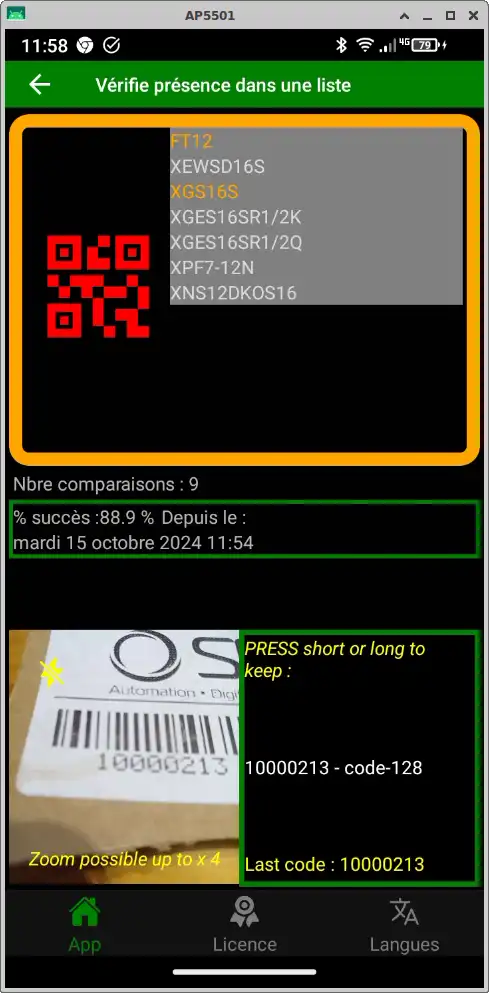
Mobile app for logistics picklist creation and verification
Prepare your logistics orders or receipts with peace of mind, using interface-free picklists!
Benefits of our mobile picklist creation and verification application
- Save operator time on picking, order-picking and receiving,
- reduce errors in item codes taken from the pricking list,
- requires no complex interfaces with your ERP: just a list of bar-coded items,
- provides proof of the added value and application of the operator’s work
- increases the company’s level of quality and customer satisfaction.
Instructions for use :
1. Create a “picklist ” from your choice of :
- barcode list reading (continuous mode, hands-free mode), (BL, packing slip, etc.).
- CSV file import this list can have intelligent and extensible formats that can indicate several pieces of information to the operator: intelligent analysis of the appropriate format will save time and information.
2 Choose a list and scan the products you wish to check:
The code read on the item is instantly compared with its presence in the list The application will indicate one of these states at a time, with a different audible signal and a different color display.
- taken for the 1st time and in the list to be served, (green)
- already in the list (orange)
- not in the list (red)
3 Save the result of the comparative dates and times in a csv file to prove your careful work or through our favorite no-code interface with your databases as option.
Uses of the list-based item-to-serve, item-to-delivery comparison app
- in logistics, warehouses:for shipping, picking, order preparation, order reception, pre-shipment quality control.
- in automotive suppliers
- fuel delivery and storage companies (ATEX version)
- watchmaking and screw-cutting companies
Detail of possible formats
- paper list of barcodes (whatever their symbology) with an item code (simple list)
- or QR code or Datamatrix list with a code that includes a particular format (specifications to be requested from us to give to your ERP engineer to set up printouts/reports) (positive tests done with CEGID ERP). This specific coding allows you to indicate without error :
- the name of the document (BL, Preparation, Dispatch),
- the number of lines to be scanned and expected by the app,
- item codes, quantity, destination or picking location,
- fictitious grouping items. The software’s analysis will :
- determine item groupings by location, and the quantities to be taken,
- remove phantom items such as grouping, port, etc.
Multilingual: GB / FR /IT /D: English, French, Italian, German!
For all terminals, ANDROID tablets: with your choice of one of the following reading devices: imager, scan finger, smartphone camera. Try it out!
Frequently asked questions about the picklist creation and verification app
What is a picklist and how does the Productivix mobile app help me?
A picklist is a list of items to be picked in a warehouse to prepare an order, shipment or receipt. The Productivix mobile app lets you create this list without an ERP interface (by scanning barcodes or importing a CSV file) and then check each scanned item against the list, with instant visual (green/orange/red) and audible feedback.
Does the app work without an ERP connection?
Yes, this is one of its main advantages. You don’t need any complex interface with your ERP. All you need is a list of item barcodes (paper, QR code, Datamatrix or CSV file). The app compares scanned items to the list and saves the results.
What types of barcodes are supported?
The app supports all common barcode symbologies, as well as QR codes and Datamatrix. It can read simple formats (one item code per scan) or extended formats that include the document name, line counts, quantities and picking locations.
Which devices can I use this app on?
The app runs on all Android terminals and tablets equipped with a reading device: imager, scan finger or smartphone camera. A test APK version is available on request.
Which business sectors use this solution?
The solution is used in logistics and warehousing (shipping, picking, order preparation, receiving, pre-shipment quality control), automotive suppliers, fuel delivery and storage companies (ATEX version), and watchmaking/screw-cutting industries.
How are the verification results displayed?
Each scan is instantly compared against the picklist. The app displays a color code: green (item present and picked for the 1st time), orange (already picked), red (not in the list). A distinct audible signal accompanies each status. Results can be exported to CSV.
Can I test the app before purchasing?
Yes, a test version is available on request. Productivix provides a download link and QR code to install the APK on your Android smartphone. The trial version is quantitatively limited over 30 days, with a qualification call before shipment.
Ask us for the test app loading link.
You already have an Android smartphone and would like to try out this mobile application module ?
Android app (Apk) provided on Productivix private repository, on request - link and loading QRcode provided To install it, read here
Quantitative test limit displayed according to modules, over 30 days. Qualification customer call before shipment.
Do you have a similar need? Don’t hesitate to tell us what you need: a copy of a pencil drawing of an interface, examples of interface files, a video of an obsolete software program in action will be enough.