Free barcode scanning test app – Web PWA & Native Android
Looking to modernize your barcode processes? Test free barcode reading right now
Before investing in a professional solution, check what your barcodes actually contain. Our two free test applications — a universal web app (PWA) and a native Android app — let you validate the technical feasibility of your project, with no commitment.
| Key benefit | Why it matters to you |
|---|---|
| ✅ Risk-free test | Free, no complex sign-up |
| ✅ Cross-platform | Works on Android, iOS, Apple, Windows, Linux |
| ✅ Offline first | The web app works even without an internet connection |
| ✅ Validate your hardware | Test your Bluetooth scanner, imager, rugged terminal or phone camera |
| ✅ Immediate usability | Intuitive interface, results in seconds |
Two complementary applications for all your needs
🌐 Web PWA Application – Universal (mobile, tablet, computer)
One installation, all your devices. Our Progressive Web App (PWA) installs in one click and works offline.
Included features:
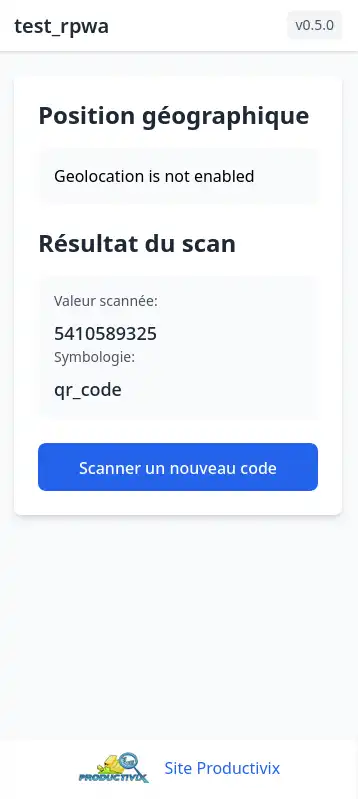
- 📍 Geolocation : capture and display of smartphone position (indicative – do not use for navigation)
- 📷 Camera scan : instant reading of the 1st detected barcode, showing its content and symbology (CODE 128, EAN 13, QR Code, DataMatrix, etc.)
- 🔌 Scanner scan : compatible with any Bluetooth or USB scanner connected to your computer (any operating system). Supports imagers on rugged terminals (contact us for setup)
- 🖨️ Network printing : print labels directly to your network printer
- 💾 Offline mode : save scans directly in the terminal browser, even without connection
📖 Install and configure the Web App →
📱 Native Android Application – Optimal performance
Built for professionals. The native app fully leverages your Android device (smartphone or tablet).
Advanced features:
- 📸 OCR and barcode reading via camera
- 🎯 On-the-fly multi-code scanning : capture multiple codes simultaneously
- 🔍 Augmented reality : find a specific code among many (up to 30 attempts)
📊 Quick comparison: which app should you choose?
| Criteria | Web PWA Application | Native Android Application |
|---|---|---|
| Supported devices | Android, iOS, Windows, Linux, macOS | Android only |
| Installation | None (via browser) | APK download |
| Offline mode | ✅ Yes | ✅ Yes |
| Multi-code scan | ❌ 1 code at a time | ✅ Multiple codes on the fly |
| Augmented reality | ❌ No | ✅ Yes |
| OCR (character recognition) | ✅ Not in this app, available on request | ✅ Yes |
| Bluetooth/USB scanner | ✅ Yes | ❌ No |
| Imager | ✅ Yes | ✅ Yes |
| Geolocation | ✅ Yes | ✅ Yes |
| Ideal for | Quick test, hardware validation, multi-OS | Advanced testing, volume scanning, professional use |
❓ Frequently Asked Questions – FAQ
1. Are the barcode test applications really free?
Yes, both applications (web PWA and native Android) are free for the barcode testing features presented on this page. The web app is accessible at no cost via your browser. The Android APK is provided on request with no obligation.
2. What types of barcodes can I read with these applications?
All our applications support major symbologies: CODE 128, CODE 39, CODE 93, CODABAR, DATAMATRIX, EAN 13, EAN 8, ITF, QR CODE, UPC A, UPC E, PDF417, AZTEC. On native Android, OCR (optical character recognition) is also available as an option.
3. Can I use a Bluetooth scanner or USB scanner with these applications?
Yes, only the Web applications support Bluetooth scanners and USB scanners. The web PWA detects them as a standard input device. For imagers integrated into rugged terminals (Zebra, Datalogic, etc.), specific configuration is required. Contact us for setup.
4. Does the web application work without an internet connection?
Yes, the web application is a PWA (Progressive Web App) that can be installed and used offline. Scans are saved locally in the terminal browser and can be synchronized later.
5. Can I test the application before deciding to purchase a professional license?
Absolutely. The test applications let you validate reading your own barcodes and hardware compatibility. For full professional applications for inventory, stock management and supply-chain, a 30-day trial is available with limited features, followed by an annual license per terminal.
6. Which devices are compatible with the native Android application?
The native application works on all Android smartphones and tablets from version 7.1, equipped with a camera. It is also compatible with professional terminals equipped with an integrated imager.
7. How can I get the download link for the Android APK?
The Android APK is provided on a private Productivix repository and the Web app via a link, upon request. Fill in the contact form below and we will send you the download links and QR Code. Specify which app you want to test. A quick qualification call will be scheduled before sending.
8. Can these applications print labels?
The web PWA application allows label printing on a network printer. Contact us for specific settings according to your printer model.
9. Does geolocation work indoors?
Geolocation uses GPS and Wi-Fi. It is indicative and should not be used for navigation or precise measurement. Indoors, accuracy may vary depending on Wi-Fi and GPS coverage.
🚀 Ready to test? Request your free access
Have a project in mind? Want to check a scanner or terminal compatibility? Tell us about your needs: an interface sketch, sample files, a video of your current process — anything helps us support you faster.
What you get with your request:
- Web PWA app access link, usable immediately
- Android APK on private repository with QR Code
- Technical advice to configure your hardware (scanner, imager, printer)
Do you have other barcode reading needs?
Our professional inventory, supply-chain, tracking and stock management applications are modular and adapt to all industries (retail, logistics, production, medical). Discover the full range →